
World Clock
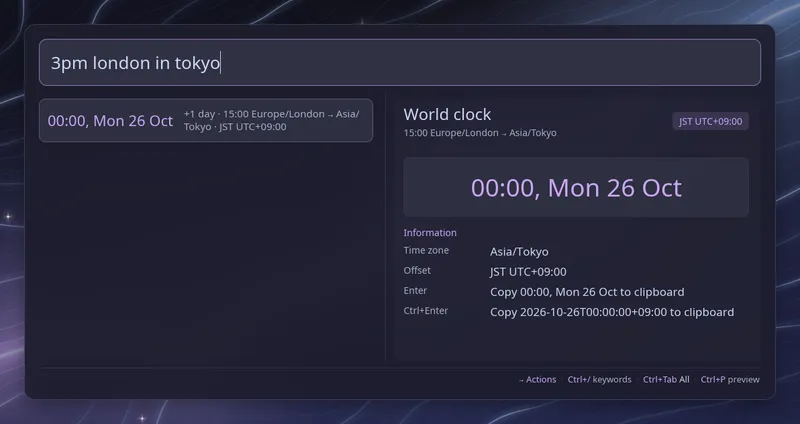
Ask for the time somewhere else and Raffi shows it above your launchers. No keyword setup is needed:
time tokyo → 05:00, Sat 17 Oct +1 day · Asia/Tokyo · JST UTC+09:00time in new york → 16:00 America/New_York · EDT UTC-04:00now in paris → 22:00 Europe/Paris · CEST UTC+02:0015:00 paris to nyc → 09:00 15:00 Europe/Paris → America/New_York3pm london in tokyo → 23:00 15:00 Europe/London → Asia/TokyoPress Enter to copy the time as shown, or Ctrl+Enter to copy a full timestamp
such as 2026-10-17T05:00:00+09:00. Copying needs wl-copy, xclip or xsel.
Places
Section titled “Places”A place is the city part of a time zone name, so tokyo finds Asia/Tokyo
and new york finds America/New_York. Case does not matter and spaces stand
in for underscores. The full name, such as america/new_york, works too. A few
short names are built in: nyc, sf, la, uk, utc, gmt, plus some
common cities that have no zone of their own, such as boston, seattle,
beijing and mumbai.
A fixed offset from UTC is written gmt+2 or utc-5, meaning two hours ahead
of UTC or five hours behind it. The full zone name keeps the zone database’s
reversed sign, so etc/gmt+2 is two hours behind UTC.
When a name matches several zones, for example eastern, you get one row per
zone. An unknown place shows nothing, and words that merely start with time,
like an app called timeshift, are left alone.
Converting a time
Section titled “Converting a time”Write the time, the place it is in, then to or in and the place you want.
Times can be 15:00, 9:30, 3pm or 3:30pm. The time is taken as today in
the first place.
When the result falls on another day, the row shows the date and how many days away it is, from two days before to two days after. A time skipped by a daylight saving change, such as 02:30 on the night clocks go forward, moves forward to the next valid time and the row says so. A time that happens twice when clocks go back uses the first one.
The current time is worked out as you type and does not keep ticking while the query stays the same.
Configuration
Section titled “Configuration”addons.world_clock.enabled boolean (default: true)
Enable or disable the world clock.
addons.world_clock.close_on_action boolean (default: true)
Close Raffi after copying a time. Leave it unset to follow
general.close_on_action.
addons: world_clock: enabled: false