
Password Store
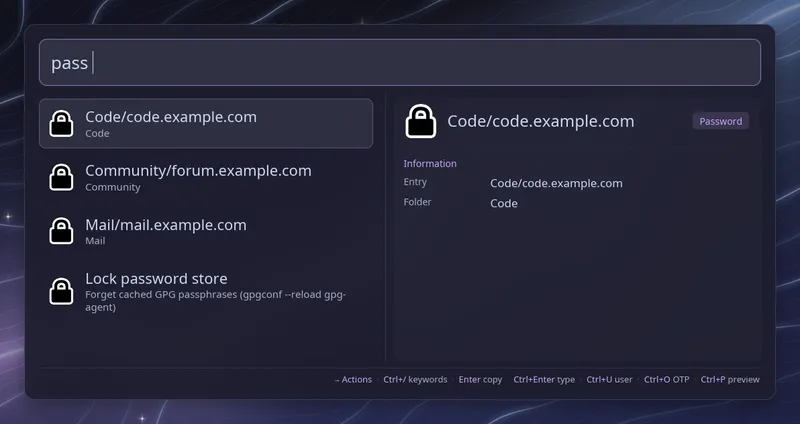
Type pass (with the trailing space) to list the entries of your
password store. Each row shows the entry
name, with its folder underneath. Words after the keyword filter the list,
so pass github finds web/github.com. Pasting a URL, such as
pass https://login.github.com/session, lists first the entries with that
site’s domain in their path (web/github.com, github.com/alice or
alice@github.com). Listing only reads file names; nothing is decrypted
until you pick an entry.
The entries you copy or type most come first, ordered by the
sort_mode used for your apps and entries
(hybrid by default, recency for most recent first). While you type,
past use only decides between equally good matches.
| Key | Action |
|---|---|
| Enter | Copy the password |
| Ctrl+Enter | Type the password |
| Ctrl+U | Copy the username |
| Ctrl+O | Copy the OTP code |
The password is the first line of the entry. The username comes from a
login: line, else user:, else username:, wherever they sit in the
entry. With none of them, it is the entry’s file name, which suits the common site/username layout. OTP
codes need the pass-otp extension
and an otpauth:// line in the entry.
Raffi closes before it types, so typing goes to the window you were in.
After a copy it closes too, unless close_on_action is
off. Copies are cleared from the clipboard after 45 seconds
(clipboard_timeout), unless something else was copied meanwhile.
The GPG passphrase
Section titled “The GPG passphrase”When gpg-agent already holds your passphrase, the entry decrypts right
away. Otherwise Raffi turns the search field into a masked passphrase
prompt. Type it and press Enter; a wrong passphrase keeps the prompt open
with an error, and Escape goes back to the list. Raffi hands the passphrase
to gpg on its standard input, and gpg-agent caches it as usual, so the next
entries and other pass commands don’t ask again.
Raffi’s prompt uses gpg’s loopback pinentry. If you use a smartcard or a
YubiKey, or your gpg-agent.conf sets no-allow-loopback-pinentry, set
pinentry: agent instead. Raffi then closes first and lets gpg-agent show
its own pinentry window, and copies or types once you have answered it.
Lock and sync
Section titled “Lock and sync”The list ends with two extra rows:
| Row | Enter |
|---|---|
| Lock password store | Run gpgconf --reload gpg-agent to forget passphrases, close Raffi |
| Sync password store | Run pass git pull --ff-only, then reload the list |
The sync row only shows when the store is a git repository. A pull that cannot fast forward is reported as an error; Raffi never resets, stashes or forces anything.
Security notes
Section titled “Security notes”- Secrets reach
gpg, the clipboard and the typing tool on standard input, never on a command line, and are never logged or saved in the search history. - Raffi keeps when and how often you used each entry in
~/.cache/raffi/vault.cache, by entry name, so that file shows which entries you use. - What you type after
passgoes into the search history (Alt+P) when you copy or type an entry, so the history file can show which entries you looked up. Debug logs leave it out. - With
wl-copy2.3 or newer the copy is marked sensitive, which clipboard managers such as cliphist honour. That is only a hint: other managers,xclipandxselmay keep the password in their history. Tools that keep the clipboard alive after its owner exits, such as wl-clip-persist, also defeat the 45 second clearing. - Clearing the clipboard later needs
timeoutfrom coreutils. Without it Raffi refuses to copy rather than leave the password there for good; setclipboard_timeout: 0to copy without clearing. - Typing uses
wtypeorydotoolafter a short delay (type_delay_ms). Raffi cannot check which window has the focus by then, so make sure it is the one you expect, especially after a pinentry window.
To open the list from a key binding, pass the keyword as the initial query:
raffi -i "pass "Configuration
Section titled “Configuration”addons.pass.enabled boolean (default: true)
Set it to false to turn the password store list off.
addons.pass.trigger string (default: pass)
Keyword that opens the entry list. Type it followed by a space. A script filter, text snippet source or web search with the same keyword takes precedence.
addons.pass.store_dir string (default: $PASSWORD_STORE_DIR, else ~/.password-store)
Password store directory. ~ is expanded.
addons.pass.pinentry raffi | agent (default: raffi)
Who asks for the GPG passphrase when gpg-agent doesn’t have it cached:
Raffi’s own masked prompt, or gpg-agent’s pinentry after Raffi closes. Use
agent for smartcards and YubiKeys, or when loopback pinentry is disabled.
See The GPG passphrase.
addons.pass.username_fields list of strings (default: [login, user, username])
key: value lines read as the username, tried in this order: the first
field found in the entry wins, wherever its line sits. Without one, the
entry’s file name is used.
addons.pass.clipboard_timeout integer (default: 45)
Seconds before a copied secret is cleared from the clipboard, unless
something else was copied meanwhile. 0 never clears it.
addons.pass.type_delay_ms integer (default: 200)
Milliseconds to wait after Raffi closes before typing, so the previous window has the focus back.
addons.pass.close_on_action boolean (default: true)
Close Raffi after copying a password, username or OTP code. When unset,
general.close_on_action applies. With false, Raffi stays open after a
copy. Typing always closes Raffi, and so does any action that needs
gpg-agent’s own pinentry with pinentry: agent.
addons: pass: store_dir: ~/work/password-store pinentry: agent username_fields: [login, email] clipboard_timeout: 20 type_delay_ms: 300 close_on_action: false