
Run in Terminal
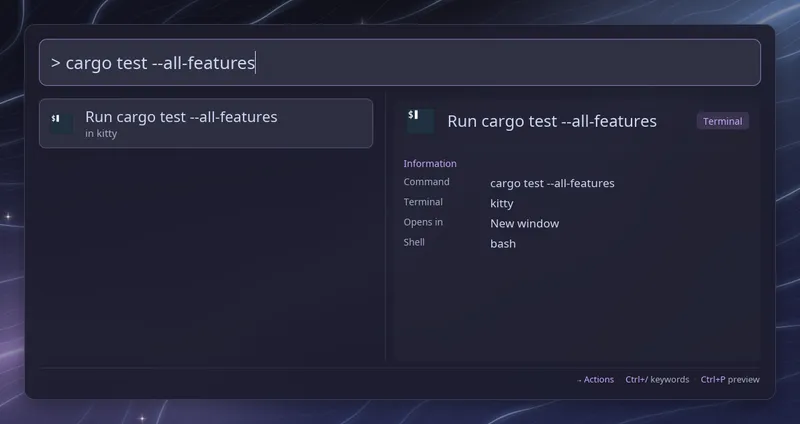
Type > followed by a space and a command, such as > htop or
> journalctl -f, then press Enter. Raffi closes (unless
close_on_action is off) and runs the command in a
terminal window, or in a new tab of a running kitty or WezTerm (see
below). While the command is empty, the row
says which terminal will be used.
The command runs through general.default_script_shell (bash by default)
with -c, so pipes, && and quotes work as in a shell. Use a POSIX-style
shell such as bash, zsh or sh here. Once the command exits, the window stays
open showing its exit status until you press Enter. Set hold: false to
close it right away.
Commands typed here are saved in the search history, so Alt+P brings back the previous one.
Which terminal
Section titled “Which terminal”Raffi uses the first of these that works:
addons.terminal.command, when setxdg-terminal-exec, when installed$TERMINAL, when set to an installed program- the first of kitty, foot, alacritty, wezterm, ghostty, konsole, gnome-terminal, xfce4-terminal and xterm that is installed
When none is found, the row says “No terminal found, set addons.terminal.command”.
command is the start of the command line, and the shell command is added
after it. Include the flag your terminal needs before the program to run:
addons: terminal: command: [alacritty, -e] # command: [wezterm, start, --] # command: [foot]The same terminal opens desktop apps marked Terminal=true when
installed apps are listed.
Tabs in kitty and WezTerm
Section titled “Tabs in kitty and WezTerm”When the terminal found above is kitty or WezTerm and one is already running, the command opens in a new tab of it instead of a new window, and Raffi brings its window to the front on Hyprland, sway and niri. The row then reads “in a new kitty tab”. Raffi first asks the terminal, without changing anything, whether it accepts remote commands. When no instance is running or it does not answer that, a new window opens as usual. Once the tab has been asked for, a failure is reported and nothing else opens, since the tab may have opened anyway. The tab starts in the directory Raffi was started from.
This only applies when the terminal is picked as kitty or WezTerm. With
xdg-terminal-exec installed, set command: [kitty] or
command: [wezterm, start, --] to get tabs. Set open_in: window to always
open a window.
kitty needs remote control turned on, with a socket, in kitty.conf:
allow_remote_control socket-onlylisten_on unix:${XDG_RUNTIME_DIR}/kittyRaffi reads listen_on from kitty.conf (not from files it includes) and
finds the newest of your kitty processes listening there. A socket another
user created under the same name is ignored. Only Unix sockets are used: a
tcp: address opens a window. Set kitty_socket to the same value when
kitty gets its address elsewhere, such as from --listen-on. When Raffi
itself runs inside kitty, that kitty is used, with the same checks.
WezTerm needs nothing: Raffi finds the newest running WezTerm through its
socket under $XDG_RUNTIME_DIR/wezterm, and the tab opens in the window
that last had focus. When WezTerm does not know which window that is, the
tab goes to the first window wezterm cli list shows. Raffi only brings
WezTerm to the front when it has a single window, since WezTerm titles its
windows its own way.
As a fallback
Section titled “As a fallback”Add addons.terminal to fallbacks to get a “Run ’…’ in kitty” row at the
bottom of every search, so any query can be run without typing > first:
general: fallbacks: - addons.terminalConfiguration
Section titled “Configuration”addons.terminal.enabled boolean (default: true)
Set it to false to turn off the trigger. Installed apps
marked Terminal=true are then left out too.
addons.terminal.trigger string (default: >)
Keyword that starts a command. Type it followed by a space, then the command. A script filter, text snippet source or web search with the same keyword takes precedence.
addons.terminal.command list of strings (default: found automatically)
Terminal command line the shell command is added to, such as
[alacritty, -e] or [wezterm, start, --]. When unset, Raffi picks one as
described in Which terminal. The same terminal opens
desktop apps marked Terminal=true.
addons.terminal.hold boolean (default: true)
Keep the window open after the command exits, showing its exit status, until you press Enter.
addons.terminal.open_in tab | window (default: tab)
tab opens the command in a new tab of a running kitty or WezTerm when that
is the terminal used, and a new window when none is running. window always
opens a new window. Desktop apps marked Terminal=true always open a window.
See Tabs in kitty and WezTerm.
addons.terminal.kitty_socket string (default: listen_on from kitty.conf)
kitty remote control address, written as for kitty’s listen_on, such as
unix:${XDG_RUNTIME_DIR}/kitty. kitty adds its process id to the address,
unless it contains {kitty_pid}, and Raffi picks the newest of your kitty
processes listening there. Only Unix sockets are used; a tcp: address
opens a window.
addons.terminal.close_on_action boolean (default: true)
Close Raffi after starting the command. When unset, general.close_on_action
applies.
addons: terminal: trigger: "!" command: [foot] hold: false open_in: window # tab or window kitty_socket: unix:/tmp/mykitty close_on_action: false