
Media Controls
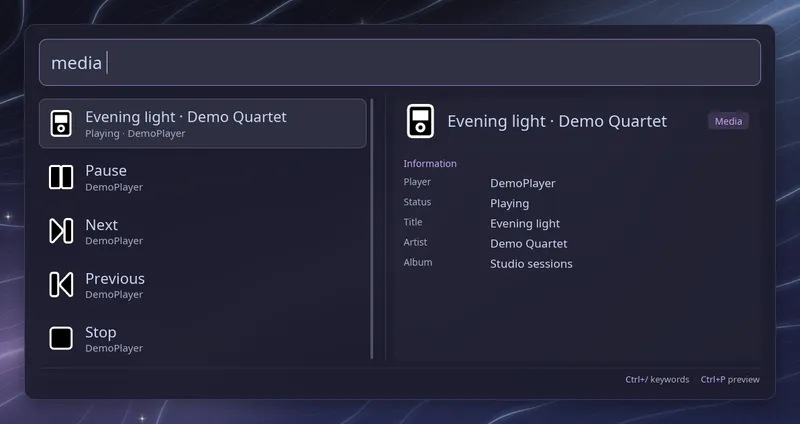
Type media (with the trailing space) to control the media players that
are running, such as Spotify, mpv or a browser playing a video. Each player
gets a header showing what is playing, its artist, whether it is playing or
paused and the player name. Below it are four rows: Play or Pause, Next,
Previous and Stop.
Words after the keyword filter the rows by action or player name, so
media next lists the Next row of every player and media spotify keeps
only Spotify.
| Key | Action |
|---|---|
| Enter | Run the selected action on its player |
Raffi stays open after an action and refreshes the list, keeping the same
row selected, so you can press Enter on Next several times in a row. When an
action fails, an error row appears at the top of the list. Set
close_on_action: true to close Raffi after each action instead.
The header rows only show information and do nothing when selected. Queries typed in this mode are saved in the search history when you run an action.
To open the controls from a key binding, pass the keyword as the initial query:
raffi -i "media "Configuration
Section titled “Configuration”addons.media.enabled boolean (default: true)
Enable or disable the media controls.
addons.media.trigger string (default: media)
Keyword that opens the controls. Type it followed by a space. Web searches with the same keyword take precedence.
addons.media.close_on_action boolean (default: false)
Close Raffi after an action. By default Raffi stays open and refreshes the
list, so you can press Next several times in a row. When unset, Raffi
follows general.close_on_action if you have set it.
addons: media: trigger: "mu" close_on_action: true