
Browser History
Type hist (with the trailing space) to search the pages you visited in
your browsers. Raffi reads the history databases directly, so there is no
extension to install and the browser does not need to be running.
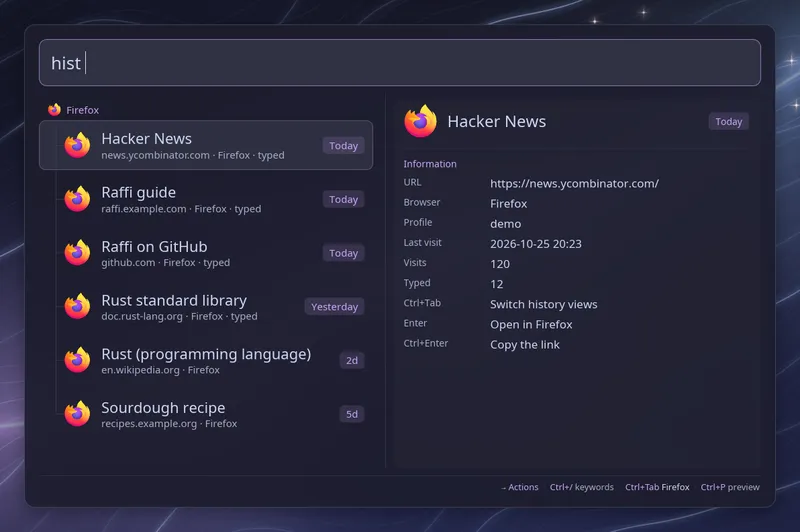
Words after the keyword match titles, addresses, browser names and profile names. Matching is literal and case-insensitive: every word must appear as a substring, and pages where a word starts with it rank first. At the same prefix quality, matches in the address rank before matches in the title. Results refresh one second after you stop typing; pressing Enter applies the pending search immediately. Each row shows the profile it came from; when a browser has several, its pages are grouped by profile.
| Key | Action |
|---|---|
| Enter | Open the page |
| Ctrl+Enter | Copy the link |
| Ctrl+Tab | Switch between browsers |
| Ctrl+R | Read browser history again |
| F5 | Have raffi --cache-daemon read it again |
Ctrl+Tab cycles browser by browser; the footer names the one shown. Raffi opens with the first browser found and reads the others the first time you switch to them, then keeps them for the session. Pages in a browser are listed by their latest visit, with a section per profile when that browser has several.
The main list still shows pages from every browser together, most recent first.
Filters
Section titled “Filters”Mix filters into the query. Words that are not filters still match titles, addresses and profiles.
| Filter | Example | Matches |
|---|---|---|
site: | site:github.com | The site and its subdomains |
browser: | browser:firefox | One browser family |
profile: | profile:work | A profile name or directory |
after: | after:7d | Visits after a time |
before: | before:2026-01-01 | Visits before a time |
after: and before: take today, yesterday, a relative duration such as
7d, 2w, 3m or 1y, or a YYYY-MM-DD date. after: includes the time
and before: excludes it. An unknown filter is treated as ordinary search
text.
What is read
Section titled “What is read”Raffi looks for profiles with history in the Firefox family (Firefox, LibreWolf, Zen, Floorp, Waterfox) and the Chromium family (Chrome and its beta and dev channels, Chromium, Brave, Edge, Vivaldi, Opera, Thorium). Each profile is listed under the browser’s name, followed by the profile name when a browser has several.
Only http and https pages are kept. Internal pages such as about:,
chrome:// or extension pages, as well as local files, data URLs and
JavaScript URLs, are skipped. Raffi reads a bounded number of the most recent
and most visited addresses per profile (max_entries, default 2000).
Firefox and Chromium keep their latest changes in separate log files until the browser closes, so Raffi reads a private copy of the database and its logs, then deletes the copy. Pages visited a moment ago therefore show up while the browser is still open.
To collapse tracking links, Raffi normalizes addresses before comparing them: it lowercases the scheme and host, drops default ports and common tracking parameters, and ignores a trailing slash. The version you open is the raw address from the most recent visit.
Browsers and profiles
Section titled “Browsers and profiles”Enter opens a page in the browser and profile it comes from. When that
browser’s program is not found, for example when it is installed as a Flatpak,
the link goes to your default browser through xdg-open. On Hyprland, niri and
sway, Raffi then focuses the browser window it last used, where the link opens,
starting the browser when needed.
List sources to choose what is read; this replaces the detection.
addons: browser_history: open_with: brave sources: - browser: firefox profile: default-release name: Firefox open_with: chrome - browser: chromium - path: ~/snap/chromium/History open_with: ["qutebrowser", "--target", "tab", "{url}"]browserreads every profile of that browser, or onlyprofile, given by its name or directory.pathreads a ChromiumHistoryfile, a Firefoxplaces.sqlite, or a profile directory holding one. Addbrowserto open its pages in that browser and profile.nameis the label the source shows in the list, the preview and the by-browser view.
open_with picks what opens the pages: a browser (firefox, librewolf,
zen, floorp, waterfox, chrome, chrome-beta, chrome-dev, chromium,
brave, edge, vivaldi, opera, thorium) or a command, where {url}
stands for the page. Set on a source, it applies to that source; set on
browser_history, to every source without its own.
A source that cannot be read shows as a row when the list opens.
Site icons
Section titled “Site icons”Pages show the icon of their site, found the same way as for
browser tabs: first in the browser profile,
then downloaded through the service set by browser_tabs.favicon_service.
Set it to none to keep everything local.
In the main list
Section titled “In the main list”Browser history is opt-in in the main list. To find visited pages without
typing hist first, add browser_history to
general.main_view:
general: main_view: - launchers - browser_historyTyping rust docs then lists the matching pages next to your launchers.
Configuration
Section titled “Configuration”addons.browser_history.enabled boolean (default: true)
Enable or disable the browser history list.
addons.browser_history.trigger string (default: hist)
Keyword that opens the list. Type it followed by a space.
addons.browser_history.max_entries integer (default: 2000)
Most recent and most visited addresses read per source, clamped between
100 and 10000.
addons.browser_history.cache_seconds integer (default: 300)
How long a parsed snapshot stays reusable. Raffi fingerprints each browser
database and its -wal and -shm companions, so it reparses as soon as the
browser writes a visit, even before the timer expires. The snapshot lives in
$XDG_CACHE_HOME/raffi/browser-history/; raffi --refresh-cache removes it.
With raffi --cache-daemon, the snapshot is also warmed while Raffi is
closed.
addons.browser_history.open_with string | list of strings (default: source browser)
Browser name or command argv ({url} placeholder) that opens pages from
sources without their own open_with.
addons.browser_history.sources list of objects (default: auto-detected profiles)
Explicit history sources (browser, profile, path, name, open_with),
replacing automatic profile detection.
addons.browser_history.close_on_action boolean (default: true)
Close Raffi after opening or copying a page. Leave it unset to follow
general.close_on_action.
addons: browser_history: trigger: "h" max_entries: 5000 close_on_action: falseSee the addon reference for how
addon keywords and close_on_action work across Raffi.