
Kill Process
Type kill (with the trailing space) to list your processes, the ones using
the most memory first. Each row shows the process name, then its pid, its
memory use and its command line. Only processes running as your user are
listed. Raffi itself and the program that started it are left out, and so are
kernel threads and processes that have already exited.
Words after the keyword filter the list by name, pid or command line, so
kill firefox or kill 4242 narrows it down.
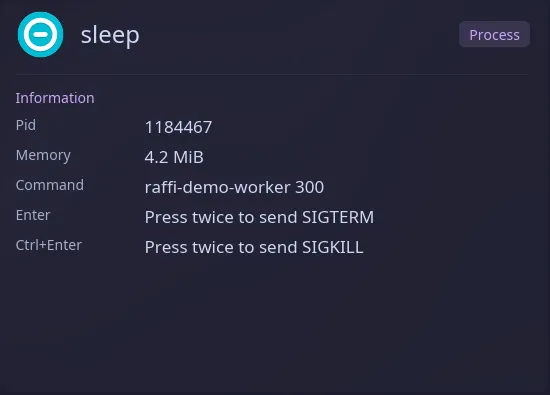
| Key | Action |
|---|---|
| Enter | Press twice to send SIGTERM (ask to quit) |
| Ctrl+Enter | Press twice to send SIGKILL (force quit) |
Both signals need a second press on the same process with the same key. The first press shows “Press Enter again to send SIGTERM to …” on the row. Moving the selection, typing, changing the modifier or a list refresh cancels it, and holding Enter down does not count as a second press.
Raffi stays open after a signal and refreshes the list, unless
close_on_action is on. When a process is
gone, was replaced, or can’t be signalled, an error row appears at the top of
the list and the list refreshes. Queries typed in this mode are saved in the
search history when you run an action.
To open the list from a key binding, pass the keyword as the initial query:
raffi -i "kill "Configuration
Section titled “Configuration”addons.kill.enabled boolean (default: true)
Set it to false to turn the process list off.
addons.kill.trigger string (default: kill)
Keyword that opens the process list. Type it followed by a space. A script filter, text snippet source or web search with the same keyword takes precedence.
addons.kill.close_on_action boolean (default: false)
Close Raffi after sending a signal. When unset, general.close_on_action
applies, and Raffi stays open if that is unset too.
addons: kill: trigger: "pk" close_on_action: true