
Developer Tools
Transforms
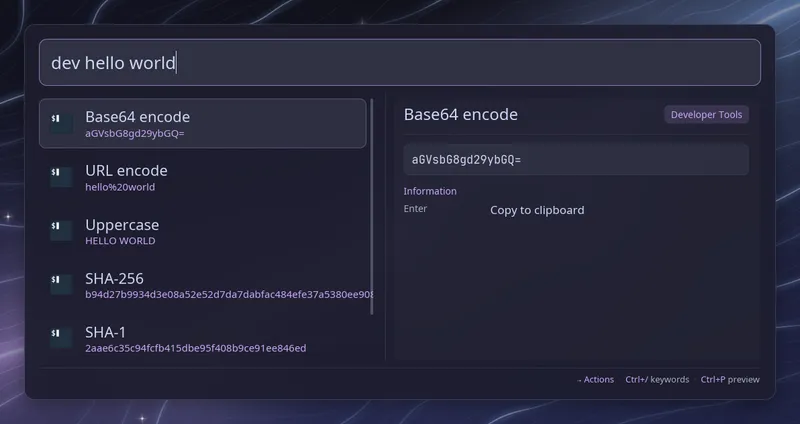
Section titled “Transforms”Type dev (with the trailing space) followed by some text, and Raffi lists
what that text becomes once transformed. Each row shows the name of the
transform with its result underneath. Press Enter to copy the result; Raffi
closes once the copy has worked (unless close_on_action
is off) and stays open with an error row if it did not.
dev hello world → Base64 encode aGVsbG8gd29ybGQ= URL encode hello%20world Uppercase HELLO WORLD SHA-256 b94d27b9934d3e08... SHA-1 2aae6c35c94fcfb4... MD5 5eb63bbbe01eeed0...The text is used exactly as typed after dev , including any extra spaces,
since a single space changes a hash or an encoding.
| Transform | Shown when |
|---|---|
| Base64 encode and decode | Decode only for valid base64 (standard or URL-safe, padding optional) that decodes to readable text |
| URL encode and decode | Decode only for valid %XX sequences that decode to readable text |
| SHA-256, SHA-1, MD5 | Always; computed with sha256sum, sha1sum and md5sum |
| Epoch to local date, Epoch to UTC date | The text is a number of seconds, or milliseconds from 100000000000 up |
| Date to epoch | The text is an RFC 3339 date such as 2023-11-14T22:13:20Z, or 2023-11-14 22:13:20 in local time |
| JSON pretty and minify | The text is a valid JSON object or array; key order is kept |
| Uppercase, Lowercase | Always |
A transform that fails on the text, or would return it unchanged, is left out. Hashes show “Computing…” for a moment while typing. If a hash tool is not installed or fails, its row says so and cannot be copied.
Generators
Section titled “Generators”Without any keyword, typing uuid shows a new random UUID (version 4), and
pw shows a random password made of letters, digits and symbols. Add a length
to get a different size: pw 32. Lengths go from 8 to 128 characters, and the
default of 20 can be changed with password_length. A new value is made each
time the query changes. Press Enter on the row to copy it.
Launchers whose names start with pw or uuid are still listed below the
generated row.
Both use the kernel random generator (/proc/sys/kernel/random/uuid and
/dev/urandom).
Privacy
Section titled “Privacy”dev searches, uuid and pw queries are saved in the search history when
you run an action, but never written to the debug log. The generated values
themselves are not stored. Copying still goes through the system clipboard, so
a clipboard manager such as CopyQ will record a copied password like any other
copied text.
Requirements
Section titled “Requirements”sha256sum,sha1sumandmd5sumfor hashes (GNU coreutils)wl-copy,xcliporxselfor copying
Configuration
Section titled “Configuration”addons.devtools.enabled boolean (default: true)
Set it to false to turn off both the transform list and the uuid and
pw generators.
addons.devtools.trigger string (default: dev)
Keyword that opens the transform list. Type it followed by a space. A script filter, text snippet source or web search with the same keyword takes precedence.
addons.devtools.password_length integer (default: 20)
Length of passwords generated by pw without a length. Values outside 8 to
128 are brought back into that range.
addons.devtools.close_on_action boolean (default: true)
Close Raffi after copying a transformed or generated value. When unset,
general.close_on_action applies.
addons: devtools: trigger: "tx" password_length: 32 close_on_action: false