
Slack
Type slack (with the trailing space) to list your Slack channels, group
conversations and the people of your workspace, under a few shortcuts:
unread messages and Actions, plus unread threads and activity when Slack
has some. Actions holds message search, people search, status, presence
and snooze. Words after the keyword filter the list. With no filter,
unmuted unread channels, group conversations and direct-message people
appear just after the shortcuts, newest first. The remaining conversations and people keep their
usual usage ordering.
To mix Slack into the main list without typing its keyword, add it under
general.main_view. An empty query shows your unread or recently opened
channels and direct messages (muted and unused channels stay hidden until you
type or focus Slack with Ctrl+Tab); after two characters, typing searches
messages. You can also list specific sub-views directly: slack.unread,
slack.threads (or slack.unread_threads), slack.activity,
slack.actions, slack.directs (or slack.dms), and slack.channels.
Sub-views filter their loaded rows as you type instead of searching messages.
Slack still needs to be enabled and configured with a token command as
described below.
general: main_view: - slack - slack.threads - slack.directs| Key | Action |
|---|---|
| Enter | Open the conversation, person or message in the Slack app or the browser (open_in) |
| Ctrl+Enter | Mark an unread conversation, thread or activity item read without leaving Raffi |
| Ctrl+R | Refresh the current view and preview |
| F5 | With raffi --cache-daemon running, have the service refresh the current Home, Unread, Threads or Activity view and reload the preview. The footer then shows F5 instead of Ctrl+R |
| Ctrl+Tab | Switch between home, unread, threads, activity, people and actions (Shift goes back) |
| Ctrl+P | Show the preview pane |
The footer shows the current view. More on Ctrl+Tab.
Opening a person opens your direct conversation with them, or their
profile when you have none. Opening an unread conversation from the home
list also marks it read. Clicking a message or thread in the preview pane
jumps straight to that message or thread. Raffi opens
links in the Slack desktop app by default (slack:// links); set
open_in: browser to open app.slack.com instead.
Compositors such as Hyprland don’t let Slack bring its own window to the front, so on Hyprland, niri and sway raffi focuses the Slack window itself after opening the link. If Slack isn’t running yet, raffi waits a few seconds for its window.
Getting a token
Section titled “Getting a token”Raffi reads the token from token_command the first time the Slack list
asks Slack for something in a run, so the token can live in a password
manager. Two kinds of token work.
A user token from your own Slack app
Section titled “A user token from your own Slack app”This is the token Slack supports for this. Some workspaces only let admins install apps, or ask an admin to approve them; if you cannot, use a browser session token instead.
-
Open api.slack.com/apps, choose Create New App, then From an app manifest, and pick your workspace.
-
Paste this manifest:
display_information:name: Raffioauth_config:scopes:user:- channels:history- channels:read- channels:write- dnd:read- dnd:write- groups:history- groups:read- groups:write- im:history- im:read- im:write- mpim:history- mpim:read- mpim:write- search:read- team:read- users.profile:read- users.profile:write- users:read- users:writesettings:org_deploy_enabled: falsesocket_mode_enabled: falsetoken_rotation_enabled: false -
Install the app to the workspace, then copy the User OAuth Token (
xoxp-...) from OAuth & Permissions, and store it:Terminal window pass insert slack/token
A browser session token
Section titled “A browser session token”Without an app, Raffi can use the session of a browser where you are logged
in to Slack: an xoxc- token plus the d cookie that goes with it.
-
Open your workspace at
https://app.slack.comand open the browser developer tools. -
In the console, print the token of the open workspace:
JSON.parse(localStorage.localConfig_v2).teams[location.pathname.split('/')[2]].token -
In the storage tab (Application in Chrome, Storage in Firefox), copy the value of the
dcookie ofhttps://app.slack.com. It starts withxoxd-. Paste it as it is, still URL encoded. -
Store both, for instance with
pass insert slack/tokenandpass insert slack/cookie, and setcookie_command.
Configuration
Section titled “Configuration”addons.slack.enabled boolean (default: false)
Turn the Slack list on. It stays off until you set this and a
token_command.
addons.slack.trigger string (default: slack)
Keyword that opens the Slack list. Type it followed by a space. A script filter, text snippet source or web search with the same keyword takes precedence.
addons.slack.token_command string (required)
Shell command printing the Slack token on its first line: a user token
(xoxp-) from your own Slack app, or the session token (xoxc-) of a
logged-in browser. See Getting a token. It runs the
first time the Slack list asks Slack for something in a run.
addons.slack.cookie_command string
Shell command printing the value of the browser’s d cookie. Required with
a session (xoxc-) token, ignored with a user token.
addons.slack.warm_interval_minutes integer (default: cache_minutes when above 0)
How often raffi --cache-daemon refreshes the Slack directory, Home, Unread,
Threads and Activity views while Raffi is closed. It also re-fetches the ten
most recently viewed cached previews once they are stale. Leave it unset to
follow cache_minutes.
addons.slack.open_in desktop | browser (default: desktop)
Where Enter opens conversations and messages: the Slack desktop app
(slack:// links) or app.slack.com.
addons.slack.message_order newest_first | oldest_first (default: newest_first)
Order of the messages in the previews: the newest on top, or the oldest on top as in Slack. Thread previews always keep the first message of the thread on top, with the replies below it in this order.
addons.slack.unread_conversations list of strings (default: [])
Conversations checked by slack unread when Slack does not say which
conversations have unread messages, as with user tokens: #channel,
@handle for the direct conversation, or a conversation id. At most 30. See
Unread messages.
addons.slack.cache_minutes integer (default: 60)
How long the cached conversations, people, muted conversations and search
results count as fresh before Raffi asks Slack again. 0 asks every time.
The last home rows, unread conversations and previews show right away
whatever this is set to, and are replaced when Slack answers. See
Caching and privacy.
addons.slack.close_on_action boolean (default: true)
Close Raffi after opening a conversation, person or message. Set it to
false to stay open instead. When unset, general.close_on_action
applies. Status, presence, snooze and mark-read actions keep Raffi open
unless this is set to true.
addons: slack: enabled: true token_command: "pass show slack/token" cookie_command: "pass show slack/cookie" # session tokens only open_in: browser # or desktop message_order: oldest_first # or newest_first unread_conversations: ["#ops", "@alice"] cache_minutes: 30 close_on_action: falseStatus, presence and snooze
Section titled “Status, presence and snooze”slack actions, or the Actions row on the home list, lists Search
messages, Find people and the rows that change your status, presence and
snooze. The Actions row shows their current state. The home list keeps
them out of the way, but typing a word such as slack snooze or
slack away brings the matching ones up there too. Set status fills in slack status ; type the status after it:
slack status Lunch :pizza: 1hslack status In a meeting 30mslack status Away :palm_tree: todayThe first :emoji: becomes the status emoji. A duration at the end
(30m, 2h, 1h30m, 1d) or today clears the status after that time
or at midnight; a bare number such as room 42 stays in the text. Clear
status removes it.
Snooze rows pause notifications for 30 minutes, 1 hour, 2 hours or until
9:00 tomorrow, and slack snooze 45m for any other duration. Resume
notifications ends the snooze. Raffi stays open after these actions and
updates the rows, unless close_on_action is set to true.
Search
Section titled “Search”slack search <words> searches your messages once you stop typing. The
words use Slack’s search syntax, so in:#ops from:@alice deploy works.
Replies show a Thread pill. Enter opens the message in its conversation.
People
Section titled “People”slack people <name> finds people by name once you stop typing, the ones
you have a conversation with first. Enter opens your direct conversation
with them, or their profile.
People show their full name followed by their login in parentheses, such
as Alice Adams (alice). If no full name is available, Raffi uses their
display name or login.
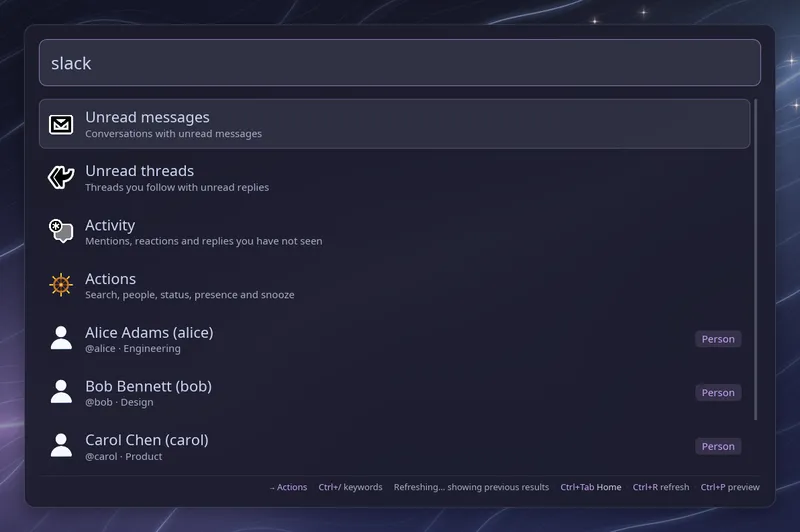
Bots and apps show up too, after the people, with a Bot badge. The home list only shows the bots you already have a direct conversation with, such as Slackbot or a Jira bot. Enter opens that conversation in Slack.
Enterprise Grid
Section titled “Enterprise Grid”An Enterprise Grid organization can have tens of thousands of people, so
the list holds your channels, your conversations and the people you talk
to. Use slack people <name> to find anyone else in the organization.
That needs a browser session token. With a user token it only finds the
people of your conversations, and Slack may refuse to list the
conversations of the organization at all.
Unread messages
Section titled “Unread messages”slack unread lists the conversations with unread messages, newest first,
with your mentions there or the number of unread messages. Enter opens the
conversation and marks it read; Ctrl+Enter marks it read without leaving
Raffi.
Muted conversations come after the others, drawn in the theme’s muted colour with a Muted badge, and only fill the list when fewer than 30 other conversations have unread messages. Typing a filter ranks them by match like any other row.
With a browser session token Slack says which conversations have unread messages. With a user token it does not, so list the conversations to check, up to 30:
addons: slack: unread_conversations: ["#ops", "#releases", "@alice"]Unread threads
Section titled “Unread threads”slack threads lists the threads you follow that have unread replies,
newest first. Each row shows the first line of the thread, its channel,
who started it and how many replies you have not read. Enter opens the
thread and marks it read; Ctrl+Enter marks it read without leaving Raffi.
Activity
Section titled “Activity”slack activity lists the unread items of Slack’s Activity tab: mentions,
reactions to your messages, new replies in your threads, and new messages
in direct conversations and bot conversations. Enter opens the message;
opening it in Slack clears it from the list. Ctrl+Enter marks the
conversation or thread read up to that message without leaving Raffi.
Reaction rows have no Ctrl+Enter.
Both lists need a browser session token. Slack refuses them for a user token, and Raffi says so in the list.
Previews
Section titled “Previews”With the preview pane open (Ctrl+P), the selected row shows:
| Row | Preview |
|---|---|
| Channel or group | The latest messages |
| Person | Their avatar and your latest direct messages |
| Search result | The messages around it, or its thread up to it |
| Unread | The unread messages |
| Thread | The thread |
| Activity | The thread of the message, or the messages around it |
Messages are listed newest first, under a divider for each day. Threads
keep their first message on top. Set message_order: oldest_first to read
them the other way.
Previews load after a short pause on a row. Errors, such as a missing scope, show in the pane.
Pictures
Section titled “Pictures”People and direct messages show the person’s avatar, and channels show
the workspace icon, since Slack has no picture per channel. Group
conversations keep the generic icon. Pictures are downloaded in the
background for the rows in view, up to 30 at a time, and kept on disk.
The workspace icon needs the team:read scope and is asked again once a
week; without it, channels keep the generic icon.
Caching and privacy
Section titled “Caching and privacy”Raffi keeps what Slack last answered in ~/.cache/raffi/slack/ and shows it
at once, then replaces it when Slack answers again:
directory.json: conversations and people, refreshed in the background once older thancache_minutes(an hour by default), or right away with Ctrl+R or the Reload conversations and people row.live.jsonandunread.json: your status, presence and snooze, and the conversations with unread messages, asked again every time the list opens.threads.jsonandactivity.json: your unread threads and activity, asked again every time you open those lists.muted.json: your muted conversations, asked again once older thancache_minutes.previews/: the text of the last 500 previews, so a preview you saw before shows without waiting while Slack is asked for the current one.avatars/: profile pictures and the workspace icon.
Searches are kept in memory for cache_minutes while Raffi runs, so
typing back to an earlier query shows its results without asking again.
Set cache_minutes: 0 to always ask Slack. Cached data is dropped after a
day, or after cache_minutes if that is longer. When a refresh fails,
the last answer stays: an unread list Slack could not check shows the
previous one with a warning on top. How often you open each conversation
is kept in usage.cache.
Each cache belongs to the Slack account and workspace that fetched it.
Until Slack answers, Raffi shows the cache of the account it last used.
If token_command now prints another account’s token, Raffi drops that
account’s directory, searches and previews as soon as Slack says so, and
fetches the new account’s.
The cache files are readable by you only, but the previews hold message
text. raffi --refresh-cache removes everything but the usage counts.
Raffi never writes the token or the cookie to disk and keeps them in
memory only while it runs.
To open the list from a key binding, pass the keyword as the initial query:
raffi -i "slack "