
Window Switcher
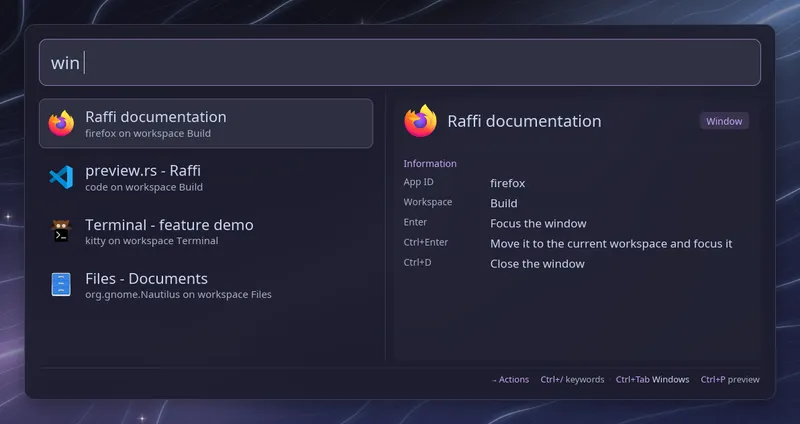
Type win (with the trailing space) to list the open windows, the most
recently used first. Each row shows the window title, its application (the
class on Hyprland, the app ID on niri and sway, or the class of an Xwayland
window on sway) and its workspace, with the application icon when one is
found. Words after the keyword filter the list
by title or application, so win fire finds Firefox.
| Key | Action |
|---|---|
| Enter | Focus the window, switching to its workspace |
| Ctrl+Enter | Move the window to the current workspace and focus it |
| Ctrl+D | Close the window and stay in the list |
| Ctrl+Tab | Switch to the workspaces view |
Raffi closes first, then asks the compositor to switch. If that fails,
Raffi reports the error as a notification (with notify-send outside
Hyprland).
A badge on the right shows the most notable state of a window: fullscreen, maximized, pinned, floating, grouped, urgent or XWayland, depending on what the compositor reports. The detail pane lists all of them. With more than one monitor, Hyprland rows also name the monitor after the workspace.
Ctrl+D asks the application to close its window, the same way the compositor’s own close binding does, so an editor with unsaved changes can still ask you first. Raffi stays open and the row goes away once the window is gone.
Workspaces view
Section titled “Workspaces view”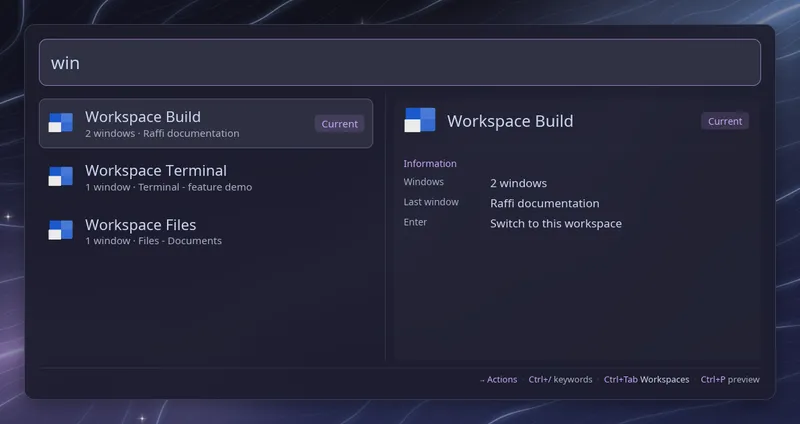
Press Ctrl+Tab in the list to see the workspaces instead, and Ctrl+Tab again (or Ctrl+Shift+Tab) to go back. The footer shows which view you are in. Each row gives the workspace name, how many windows it holds and the title of the last one used, and the monitor when there are several. The focused workspace is marked “Current”, and one shown on another monitor “Visible”. Typing filters by workspace name and by the titles and applications of its windows.
| Key | Action |
|---|---|
| Enter | Switch to the workspace |
| Ctrl+Enter | Move the window you used last there, and follow it |
Hyprland lists its special workspaces after the others, and Enter shows or hides them. On sway the scratchpad is not a workspace and is left out.
Live updates
Section titled “Live updates”While the list is open, Raffi follows the compositor’s events (Hyprland’s
event socket, niri msg event-stream, swaymsg -t subscribe) and refreshes
both views when windows open, close, move or change title, and when
workspaces come and go. The selected row stays selected. Focus changes do not
trigger a refresh, since Raffi takes the focus itself.
Hyprland
Section titled “Hyprland”On Hyprland 0.55 or later with a Lua config, Raffi sends the action with
hyprctl eval. Older versions and hyprlang configs do not support that, so
Raffi falls back to hyprctl dispatch. If the window has closed in the
meantime, Raffi reports it. Ctrl+D sends hl.dsp.window.close (or
dispatch closewindow).
Raffi runs niri msg action focus-window and, for Ctrl+Enter,
niri msg action move-window-to-workspace before focusing. It targets the
focused workspace by name when it has one. Otherwise it uses the workspace
index, and first moves a window from another monitor to the focused one,
because niri reads an index on the window’s own monitor. The list follows
the focus history on niri versions that report it, and puts the focused
window first on older ones. niri ignores a window that has closed in the
meantime, so nothing happens then. Ctrl+D runs
niri msg action close-window --id, and the workspaces view uses
focus-workspace, focusing the right monitor first.
Raffi runs swaymsg [con_id=N] focus and, for Ctrl+Enter,
swaymsg [con_id=N] move container to workspace with the focused
workspace’s name before focusing. Workspace names with quotes, semicolons or
commas work. Ctrl+Enter is not offered for the rare names sway cannot read
back, such as one ending in a backslash.
Sway has no global focus history. Raffi follows the focus order sway keeps
for each output, workspace and container, so the windows of a workspace stay
together and the workspace you used last comes first. Windows in the
scratchpad are listed last, on workspace “scratchpad”. Enter shows such a
window on the current workspace; Ctrl+Enter does the same, and the window
stays a scratchpad window. If the window has closed in the meantime, Raffi
reports it. Ctrl+D runs swaymsg [con_id=N] kill.
Raffi’s own window is left out of the list. Queries typed in this mode are saved in the search history when you run an action.
To open the list from a key binding, pass the keyword as the initial query:
raffi -i "win "Configuration
Section titled “Configuration”addons.windows.enabled boolean (default: true)
Enable or disable the window switcher.
addons.windows.trigger string (default: win)
Keyword that opens the list. Type it followed by a space. Web searches with the same keyword take precedence.
addons.windows.close_on_action boolean (default: true)
Close Raffi before focusing or moving a window. Leave it unset to follow
general.close_on_action.
addons: windows: trigger: "w"