
Themes
The native interface supports dark and light themes with full color customization.
Built-in Themes
Section titled “Built-in Themes”Raffi comes with two built-in themes:
- Dark Theme — Dracula-inspired dark palette (default)
- Light Theme — Rose Pine Dawn light palette
Selecting a Theme
Section titled “Selecting a Theme”Command Line
Section titled “Command Line”raffi -u native -t darkraffi -u native -t lightConfiguration File
Section titled “Configuration File”general: theme: dark # or "light"general: ui_type: native theme: darkDracula-inspired dark palette with high contrast
general: ui_type: native theme: light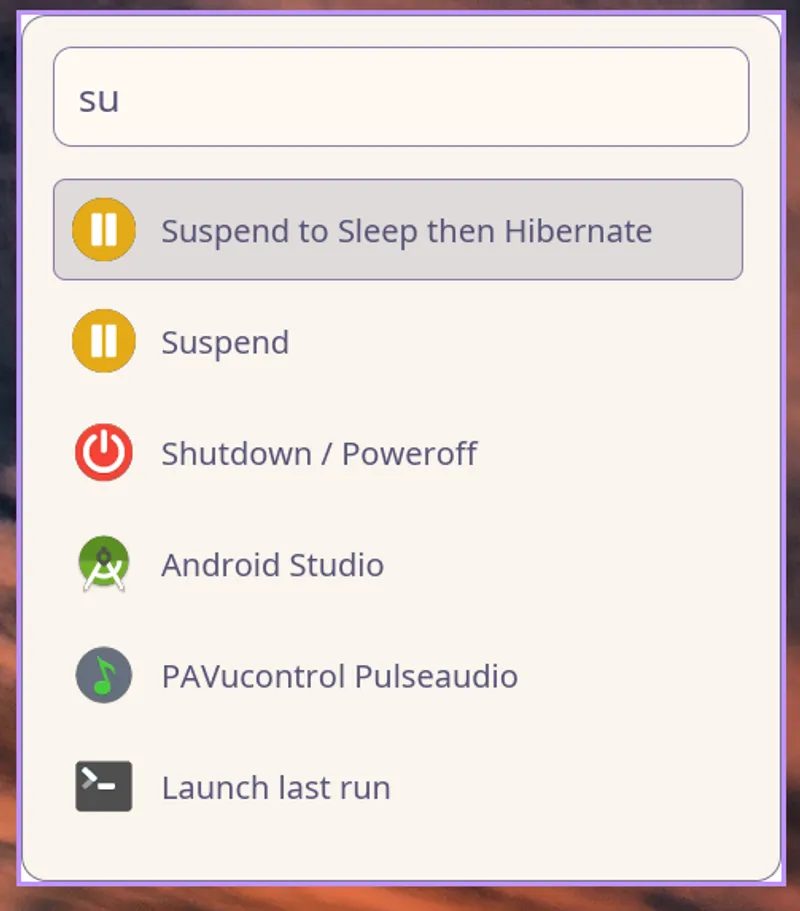
Custom Colors
Section titled “Custom Colors”Individual theme colors can be customized under theme_colors. Only the colors you specify are overridden; the rest come from the base theme.
Available Color Keys
Section titled “Available Color Keys”bg_base string
Main background color
bg_input string
Search input background color
accent string
Primary accent color (highlights, active items)
accent_hover string
Accent color on hover
text_main string
Primary text color
text_muted string
Secondary/muted text color
selection_bg string
Selected item background
border string
Border and separator colors
Color Format
Section titled “Color Format”Colors accept hex color strings in these formats:
#RGB- Short form (e.g.,#f0f)#RRGGBB- Standard form (e.g.,#ff00ff)#RRGGBBAA- With alpha channel (e.g.,#ff00ff80)
Custom Color Examples
Section titled “Custom Color Examples”Catppuccin Mocha
Section titled “Catppuccin Mocha”general: theme: dark theme_colors: bg_base: "#1e1e2e" bg_input: "#313244" accent: "#cba6f7" accent_hover: "#89b4fa" text_main: "#cdd6f4" text_muted: "#6c7086" selection_bg: "#45475a" border: "#585b70"general: theme: dark theme_colors: bg_base: "#2e3440" bg_input: "#3b4252" accent: "#88c0d0" accent_hover: "#81a1c1" text_main: "#eceff4" text_muted: "#d8dee9" selection_bg: "#434c5e" border: "#4c566a"Gruvbox Dark
Section titled “Gruvbox Dark”general: theme: dark theme_colors: bg_base: "#282828" bg_input: "#3c3836" accent: "#d79921" accent_hover: "#fabd2f" text_main: "#ebdbb2" text_muted: "#a89984" selection_bg: "#504945" border: "#665c54"Solarized Light
Section titled “Solarized Light”general: theme: light theme_colors: bg_base: "#fdf6e3" bg_input: "#eee8d5" accent: "#268bd2" accent_hover: "#2aa198" text_main: "#657b83" text_muted: "#93a1a1" selection_bg: "#eee8d5" border: "#93a1a1"Tokyo Night
Section titled “Tokyo Night”general: theme: dark theme_colors: bg_base: "#1a1b26" bg_input: "#24283b" accent: "#7aa2f7" accent_hover: "#bb9af7" text_main: "#c0caf5" text_muted: "#565f89" selection_bg: "#292e42" border: "#414868"Partial Color Override
Section titled “Partial Color Override”You can override just a few colors while keeping the rest from the base theme:
general: theme: dark theme_colors: accent: "#ff6b9d" # Custom pink accent # All other colors use dark theme defaultsFont Customization
Section titled “Font Customization”Combine theme customization with font settings:
general: ui_type: native theme: dark theme_colors: accent: "#cba6f7" font_family: "Inter" font_size: 20 window_width: 900 window_height: 500Font Settings
Section titled “Font Settings”font_family string
Font family name (e.g., “Inter”, “Fira Sans”). System default sans-serif when omitted.
font_size number (default: 20)
Base font size in pixels. Other UI sizes scale proportionally:
- Input text: 1.2× base
- Subtitles: 0.7× base
- Hints: 0.6× base
window_width number (default: 800)
Window width in pixels
window_height number (default: 600)
Window height in pixels
padding number
Outer window padding in pixels. Scales with font_size if not set.
Complete Theme Configuration
Section titled “Complete Theme Configuration”general: ui_type: native theme: dark theme_colors: bg_base: "#1e1e2e" bg_input: "#313244" accent: "#cba6f7" accent_hover: "#89b4fa" text_main: "#cdd6f4" text_muted: "#6c7086" selection_bg: "#45475a" border: "#585b70" font_family: "Inter" font_size: 20 window_width: 900 window_height: 500general: ui_type: native theme: light theme_colors: accent: "#0066cc" accent_hover: "#0052a3" font_family: "Fira Sans" font_size: 18 window_width: 800 window_height: 600Theme Previews
Section titled “Theme Previews”Default Dark Theme
Dracula-inspired palette with:
- Deep purple background
- High contrast text
- Purple/pink accents
- Excellent readability
Default Light Theme
Rose Pine Dawn palette with:
- Soft, warm background
- Comfortable contrast
- Muted accents
- Eye-friendly for bright environments
Custom Themes
Create your own by:
- Starting with a base theme (dark or light)
- Overriding specific colors
- Testing with
raffi -u native -t [theme] - Adjusting until satisfied
Color Palette Generators
Section titled “Color Palette Generators”Generate custom palettes using these tools:
Troubleshooting
Section titled “Troubleshooting”Colors not applying
- Ensure you’re using native mode:
ui_type: native - Check color format:
#RRGGBBor#RGB - Verify YAML syntax (proper indentation)
- Restart Raffi after config changes
Font not changing
- Make sure font is installed on your system
- Use exact font name (case-sensitive)
- Try
fc-listto see available fonts - Set
font_family: "Font Name"in quotes
Poor contrast
Adjust these color pairs for better readability:
text_mainvsbg_basetext_mainvsselection_bgaccentvsbg_base