
Currency Converter
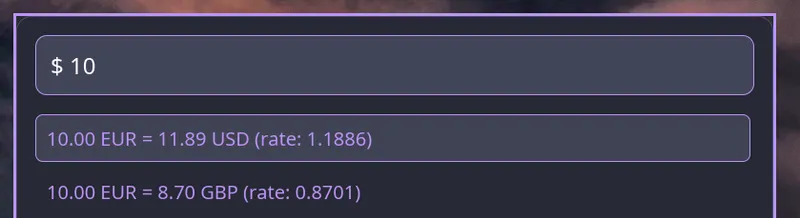
The native interface includes a currency converter with real-time exchange rates from the Frankfurter API.
Overview
Section titled “Overview”Convert between currencies by typing an amount with a trigger character (default $) followed by target currency codes. Exchange rates are cached for one hour to minimize API requests.
Basic Syntax
Section titled “Basic Syntax”<trigger><amount> to <currency><trigger><amount><source> to <target>Examples
Section titled “Examples”$10 to eur# Converts 10 USD to EUR$50 gbp to usd# Converts 50 GBP to USD$100eur to jpy# Converts 100 EUR to JPY€10 to usd# With trigger set to €Configuration
Section titled “Configuration”Configure the currency converter in your raffi.yaml:
addons: currency: enabled: true trigger: "$" default_currency: USD currencies: - USD - EUR - GBP - JPY - CAD - AUDConfiguration Options
Section titled “Configuration Options”enabled boolean (default: true)
Enable or disable the currency converter addon
trigger string (default: $)
Character that activates currency conversion. Common options: $, €, £, ¥
default_currency string (default: USD)
Source currency when none is specified (e.g., $10 to EUR assumes USD)
currencies array
List of currency codes available for conversion. If omitted, all currencies from Frankfurter API are available.
Custom Trigger
Section titled “Custom Trigger”addons: currency: trigger: "$" default_currency: USDUsage: $100 to eur
addons: currency: trigger: "€" default_currency: EURUsage: €100 to usd
addons: currency: trigger: "£" default_currency: GBPUsage: £100 to eur
Supported Currencies
Section titled “Supported Currencies”You can specify which currencies are available:
addons: currency: enabled: true currencies: - USD # US Dollar - EUR # Euro - GBP # British Pound - JPY # Japanese Yen - CAD # Canadian Dollar - AUD # Australian Dollar - CHF # Swiss Franc - CNY # Chinese Yuan - INR # Indian Rupee - BRL # Brazilian RealExchange Rate API
Section titled “Exchange Rate API”Raffi uses the Frankfurter API for exchange rates:
- Free and open-source
- No API key required
- Updated daily with European Central Bank rates
- Rates are cached for 1 hour locally
Cache Behavior
Section titled “Cache Behavior”-
First Request
Fetches live rates from Frankfurter API
-
Subsequent Requests
Uses cached rates (valid for 1 hour)
-
After 1 Hour
Automatically fetches fresh rates on next conversion
Conversion Patterns
Section titled “Conversion Patterns”Implicit Source Currency
When you don’t specify a source currency, the default_currency is used:
$10 to eur # 10 USD → EUR$50 to gbp # 50 USD → GBP$100 to jpy # 100 USD → JPYExplicit Source Currency
Specify both source and target currencies:
$10 usd to eur # 10 USD → EUR$50 gbp to usd # 50 GBP → USD$100 eur to jpy # 100 EUR → JPYCompact Format
No spaces between amount and currency:
$100eur to jpy # 100 EUR → JPY$50gbp to usd # 50 GBP → USDKeyboard Shortcuts
Section titled “Keyboard Shortcuts”- Enter: Copy conversion result to clipboard
- Esc: Clear input and return to normal mode
Disable Currency Converter
Section titled “Disable Currency Converter”To disable the currency converter:
addons: currency: enabled: falseRequirements
Section titled “Requirements”Examples
Section titled “Examples”$1000 to eur # Planning trip to Europe$99 usd to gbp # Compare prices€500 to usd # Invoice conversion$10000 to jpy # Currency exchangeTroubleshooting
Section titled “Troubleshooting”No conversion results
- Check internet connection
- Verify currency codes are correct (3-letter ISO codes)
- Ensure
enabled: truein config - Check that Frankfurter API is accessible
Wrong default currency
Set default_currency in your config:
addons: currency: default_currency: EUR # Change from USD to EURTrigger not working
Make sure your trigger character doesn’t conflict with other features:
addons: currency: trigger: "$" # Or try "€", "£", etc.