Introduction
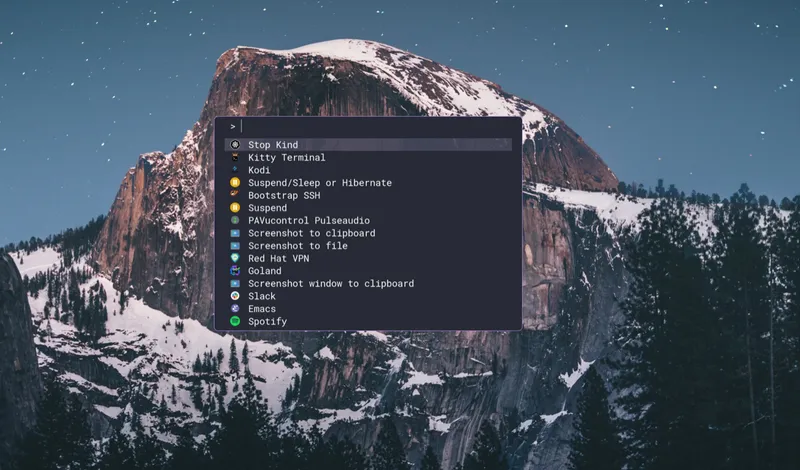
Raffi is a flexible application launcher designed for Wayland environments that lets you define commands, scripts, and workflows in a simple YAML configuration file.
What is Raffi?
Section titled “What is Raffi?”Raffi is an application launcher that sits on top of Fuzzel or operates using its own built-in native interface. It provides a powerful way to launch applications, run scripts, and execute commands with support for:
- YAML-based configuration - Define all your commands and workflows in a simple, readable format
- Icon support - Visual application identification with cached icon paths
- Script execution - Run inline scripts with configurable interpreters (Bash, Python, etc.)
- Conditional visibility - Show/hide entries based on environment variables or binary availability
- Multiple UI modes - Use external Fuzzel or the built-in native interface
Key Features
Section titled “Key Features”- Dual Interface Modes — Choose between Fuzzel integration for a minimal Wayland-native experience or the built-in iced-based GUI with fuzzy search and theming.
- YAML Configuration — Define applications, scripts, and commands in
~/.config/raffi/raffi.yamlwith support for arguments, icons, and conditional display. - Native Interface Addons — Built-in calculator, currency converter, file browser, web searches, text snippets, and script filters for extended functionality.
- Script Support — Execute inline scripts with any interpreter (Bash, Python, Node.js) directly from the launcher with environment variable expansion.
Native Interface Addons
Section titled “Native Interface Addons”When using the native UI mode (-u native), Raffi includes several powerful addons:
Calculator
Section titled “Calculator”Evaluate mathematical expressions as you type with support for standard operators and functions like sqrt, sin, cos, log, and more. Results can be copied to clipboard with Enter.
2 + 2 * 5sqrt(144)sin(90) * cos(45)Currency Converter
Section titled “Currency Converter”Convert between currencies with real-time exchange rates from the Frankfurter API (cached for one hour).
$10 to eur$50 gbp to usd$100eur to jpyFile Browser
Section titled “File Browser”Navigate your filesystem directly in the launcher. Type / for root or ~ for home directory. Select files to open with xdg-open, or use Alt+Enter to copy the path.
Script Filters
Section titled “Script Filters”Extend Raffi with dynamic results from external commands using the Alfred Script Filter JSON format. Perfect for custom workflows like PR browsers, password managers, or any data source.
Web Searches
Section titled “Web Searches”Quick web searches via URL templates. Type a keyword followed by your query to search Google, DuckDuckGo, GitHub, Wikipedia, and more.
g rust async traitsgh user/repowiki waylandText Snippets
Section titled “Text Snippets”Store and quickly insert reusable text snippets from inline config, YAML files, directories, or command output.
Use Cases
Section titled “Use Cases”Application Launcher
Launch applications with custom arguments and environment variables. Define entries only for binaries that exist in your PATH.
firefox: binary: firefox args: [--marionette] icon: firefox description: Firefox browser with marionette enabledScript Execution
Run inline scripts with any interpreter directly from the launcher.
hello_python: binary: python3 script: | import os print("Hello from Python!") print(os.environ) description: "Hello Python script" icon: "script"Conditional Workflows
Show entries only when specific conditions are met.
gnome_app: binary: gnome-tweaks description: GNOME Tweaks ifenveq: [DESKTOP_SESSION, GNOME]Window Manager Integration
Integrate with Sway, Hyprland, or other Wayland compositors for seamless launching.
# Swaybindsym $super+Space exec raffi -p | xargs swaymsg exec --
# Hyprlandbind = $super, R, exec, (val=$(raffi -pI); echo $val | grep -q . && hyprctl dispatch exec "$val")
Why Raffi?
Section titled “Why Raffi?”- Lightweight - 1.1 MB binary when built without native UI, ~15 MB with GUI support
- Flexible - Works with Fuzzel or standalone with built-in interface
- Extensible - Script filters and addons for custom workflows
- Wayland-first - Designed specifically for modern Wayland compositors
- Simple configuration - Human-readable YAML with path expansion and environment variables
Next Steps
Section titled “Next Steps”- Install Raffi — Get started with installation via cargo, AUR, Homebrew, or build from source
- Quick Start — Configure and launch your first application with Raffi